Over the past year I've heard iPeople & Windows fans make claims that "Android tablets aren't real tablets" along with grandiose assumptions such as "The victim of Windows 8 will be Android tablets" and how the iPad & upcoming Windows tablet are the only true tablets. So just what is the definition of a real tablet anyway? & more importantly to be a tablet does it have to have a Microsoft logo or piece Fruit on it?
In my short write up on the ASUS Transformer TF101 I shared what I use my tablet for & how it fits into my lifestyle. I felt the need to comment again on the usfullness of my so called "non tablet" after being without power for the past 95 hours after a nasty storm left myself and over 300,000 others in my area without power.
Like most parents when the power goes out we all try to find ways to entertain kids by playing boardgames, cards, & anything else we can do to calm down kids from the 5 to 10 age range. While all of those are great sometimes we still need the help of other entertainment such as a TV show or movie when calling the power company or getting the house setup with candles for the night ahead without power.
One of the best things I ever purchased was a $20 DC to AC 150 watt (200 watt peak) power inverter for our van to power our modified Xbox 1 XBMC unit. Using the inverter I was able to transfer more then 30 of our movies from one of our file servers hard drives by hooking it up to a external HDD enclosure & then to the Transformer's Dock powering the HDD through the inverter while also charging the tablet. Many would say "That's what Netflix is for" how can you run
Netflix with no internet & dodgy cell service due to technical
issues caused by the storm. While this sort of setup is not a new approach to many of us in the DIY community or
those of us that can look at hardware and see potential as these
options are unavailable to me on an iPad or other
Android based device such as a Samsung Galaxy Tab.
The ASUS keyboard with USB ports was a life saver when needing to charge our cell phones to keep in contact with family & find out local information such as Red Cross relief shelters in the area distributing ice & offering a place to cool off from the heat wave that hit in the days after the storm. The tablet provided entertainment for the whole family by playing over 20+ movies , charging 2 cell phones & serving as a partial flashlight while only needing to be charged twice in 95hrs.
So please... next time you decide to talk down an Android based device
think about what your counter part can do that you might not be able to
& vise versa. Take it upon your self to ask a friend or colleague
who may own such a device to give you a real demo as it might just
change your mind when you think outside of the box. As the future of portable devices comes down to more
then just the latest game or social app or the number of current apps in
the respective markets, it still does just come down to the same thing it always
has.. the hardware.
Please note that this blog post was not written to insult the family of iPads, future Microsoft devices or persons. It was meant to point out that yes many of you are %100 correct! it's not a tablet.. it's better then a tablet & most netbooks. I have a device that's marketed & sold as a tablet with a separate keyboard attachment that cost me just a little less then an iPad ( and possibly a Surface tablet) that I was able to do more with then the "real tablets" others claim as well as other current Android devices on the market just can't do. In the end as long as people can see the potential in a device's hardware, build an alternative operating system , & strive to get the most bang for their buck .... the Open Source spirit of Android will always live & show up on devices just as it has in the PC world with Linux for over 20yrs & 50 million plus users later.
Showing posts with label ASUS Transformer charger. Show all posts
Showing posts with label ASUS Transformer charger. Show all posts
Tuesday, July 3, 2012


Sunday, June 24, 2012
A Review of the ASUS Transformer TF101 A Year Later
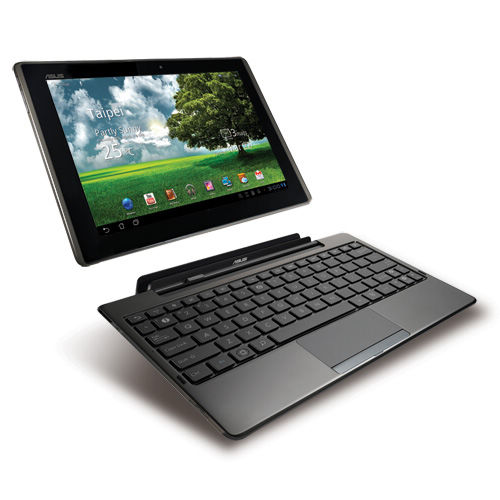
Christmas time 2011 I was in the market for a portable device that was able to handle both work & play but also have decent battery life yet be more compact then a traditional laptop. Looking at my options from online to BestBuy my best option was to choose a tablet over a laptop or netbook due to battery life and ease of use. Most of my work is spent researching information, building PDF based catalogs, customer support, updating clients online sites & shopping carts. Other then email & the occasional PDF all of my photo editing , CAD design , major gaming , & coding happens on my desktop PC or game system. With current tablets on the market offering the ability to be on a data connection was ideal for Internet on the go but more money then I needed to spend on mobile service when by default my current provider & phone allows Wifi tethering without the need to jailbreak or root the phone. In the process of shopping around & eying things up the two main choices that drove me to the ASUS TF101 Android Tablet over the iPad2 was memory expansion & HDMI output.
After bouncing from iPad2 back Android back to iPad2 the ASUS Transformer stood out strongest to gave me all I needed at a good price. Priced around the same as traditional laptops, the iPad2 and other Android devices like the Samsung Galaxy Tab the Transformer's big selling point for me was the removable keyboard that provided extended battery life (well beyond the advertised time) 2 USB ports & SD card slot.
Family
The tablet's built in GPS together with Google Maps made sight seeing planning for the next day a breeze when planning out driving routes. Google Places helped in deciding where to eat based off of user submitted reviews on local restaurants without having to dig around to the web looking for a place to eat.
Work
While the open source office options makes using the tablet for work a great choice I'd still pay the money for a Microsoft slice of Android flavored MS Office to allow for more universal document review when dealing with multiple documents across different clients. At night I am able to remove myself from the home office and spend time watching TV with the family while still catching up online with the days events or working on something for a client while still enjoying time with the family.
Play
At bedtime a mix of the Kindle App , Barnes & Noble , & Aldiko have gotten me back into the habit of reading more books not just the latest tech manual though the size of the device does make one handed reading a light strain on the wrist, but still a enjoyable experience. My favorite past time of RPG's has become more enjoyable now that I have a device with a big enough screen to pause a game and look at a map on IGN of where in the sand box style world my character needs to be.
Durability
The durability of the device has been thoroughly tested in a manner of speaking being almost put through hell & come out surviving some accidents with very little issue. The kids always want to use my table to play games from "Angry Birds" to "Chess" to the cute "LEGO" app. While most parents encourage their kids to sit at the table and play nice with the tablet I let mine disappear to that dark place all parents fear ... their room. While I have seen the tablet drop from their hands a few times and get a accidental kick from them running to pick it up it still has stood strong.
I myself have dropped & thrown the device more then a hand full of times and when I say thrown I mean full force across the room smack against the wall and .. it lived just fine. While I would not recommend dropping it from a high place glass down it can survive the rampage of child and that of a fully grown adult, not to mention surviving just fine in a locked car on a 101 degree day with 90% humidity.
Ice Cream Sandwich / Desktop OS
The one main problem myself and other owners faced was random reboots. These random reboots would happen at least twice a day for almost 3 weeks until ASUS released an update then another update then another update till finally in May of 2012 & 2 updates later all was well and the reboot issue stopped. It should be noted however that while using the official OS I did try a handful of CyanogenMod based ROM's where the random reboots where not an issue. The ICS update & continued updates since march have made some great enhancements in not only speed but also in App optimization. Apps designed for phones seemed to run better then before on the device after the update even when the App had not yet received a update adding support in for ICS.
Along with the open boot loader I can run a alternative ROM such as CyanogenMod but also a full Desktop OS like Ubuntu on a dual boot option. Ubuntu mobile edition still needs some work when going on the tablet front, but I was still able to play around within the environment and have an overall good experience with Ubuntu on the tablet. While this series of tablet may never see Ubuntu with all the bells and whistles I am sure Ubuntu will "Surface" in on other similar hardware in the months to come.
Final Thoughts
While on vacation and even on the go the included SplashTopHD remote (normally $21.99) was great to have when emails from clients came in allowing me to connect to my home computer to pull files, do some quick editing in Microsoft Expression Web & even allowed me to do some lite CAD all over WiFi & 4G.
In the part of family life it has done a well enough for me to know I made the right choice by not picking up a traditional laptop or netbook due to the Apps & services being what I need them to be to suit my needs for my family. The use of it during our vacation was a big help in trip planning as it was nice to be able to use it for Navigation when the car GPS decided to act up. At night now when normally I would be confined to the office away from the family it's most enjoyable to have a light weight device I can sit in bed with the wife & watch a movie while still being able to get things done for work.
Monday, January 30, 2012
Just Another DIY 12v DC Charger
As Seen On Hack A Day

In the following video it shows the steps that I took for making an alternative means
of charging my ASUS Transformer TF101 after the power supply seemed to give
out on me. The following charger was built from spare parts laying
around the house so out of pocket cost to me was $0.00
Nothing fancy just a simple mod by replacing the stock barrel connector from a spare 12v power supply to a USB connector, but never the less a fast a simple solution to a problem that I did not have the time or money to pick up a new one from ASUS. Yes Putting it in the freezer did correct the issue with the stock charger but now I have no need to worry with this little mod.
DO NOT Plug In USB Drives Or Other Devices Not Rated For 12v Into Power Supplies USB Port


For those without a high speed connection or who just still can't figure out what exactly it was that I did here are a few shots of the simple build
First part was finding a proper power source. As stated in the video when ever working with replacing an electronic component like a power supply for a device you should try to get an exact match if not super close. For me I used a spare 12v power supply from what was either a printer supply or other peripheral supply.

With the power ratings being close enough for me I proceeded to cut the barrel connector at the end of the power supply off. After stripping back some of the plastic shielding containing the positive and negative wire I stripped them back a little to allow for connection to the PCB board that whould house my 12v USB port. The USB port was taken off a older P3 motherboard that was laying around in the scrap pile. The best way to desolder on of these factory connections is a heat gun...bottom line they drop right out within 30 seconds of some circular heat gun motion to the area of the component your want to remove and saves on some desoldering braid


After soldering the USB port that I extracted to the PCB board I proceeded to hook up the 12v positive connection to pin 1 on the USB port which is normally a 5v connection and left ground on pin 4 where it should be.


A very important note on proper polarity as seen below. Notice that when the positive lead (red ) and negative (black) coming from the multimeter show just 12.17v while in the other picture with the blue arrow pointing to the negative symbol on the multimeter shows revered polarity as the multimeter leads are reversed. This is a MUST for making sure you have the proper wires attached to the correct places as not all wires are color coded black and red TRUST your multimeter not just wire colors.


After making sure things matched up properly I proceeded to tuck my wires back with a zip tie to the PCB board and place everything in a general hardware store piece of heat shrink tubing to protect against accidental electrical shock and protect my connections.


F.A.Q
More then a handful of messages have shown up in my email box , direct message on Twitter , and Youtube. I have answered more then a handful here as your questions might be one of them
Q. See that's what you get for not buying an iPad2
A. Yes , your right cause an Apple product has never had a general hardware connection issue in the history of the tablet, smart phone, MP3 player era. By that thinking then I should dump Windows cause it can get a virus and malware.
Q. Why a USB port and not just get a USB to barrel connector?
A. The whole point of why I had to put this together was at the time I need to charge it and didn't have the time nor money to find a USB to barrel connector to charge it.
Q. What's does the freezer trick do and does it work?
A. Nothing more then allow the internal thermal fuse to cool off and reset to allow for charging. 30 minutes in the freezer will do the trick in a zip lock bag to prevent moisture from getting in the internal components. 15 minutes out of the freezer and you should be fine to try charging your device.
Q. How many times have you had to freezer your power supply.
A. For me personally I have only had to do it once and has worked fine since the first day I tried freezing it.
Q. Why not just charge it through your computer...duh?
A. Cause unless you have a USB connection on your PC that gives off 12v instead of 5v then it will only charge at 5V which does nothing for a charge. Maybe if I left it on and hooked up all night it might but why charge at 5v when the device can handle charging at 12v and it's charger outputs 12v.
Subscribe to:
Posts (Atom)